
01
Command
always onMission Control, the war room, reports, documents and the shared record spine every other module writes into.
Mission ControlOwner PortfolioReportsDocuments
Estimating, purchasing, job cost, dispatch, compliance, and billing on one record — so nothing gets re-typed, re-priced, or lost between the field and QuickBooks.
Starting at $495 per company. Priced during onboarding based on modules and users.
Built by a contractor. Running live on real jobs, not a demo dataset.
The two-minute version
Runs 1:55, with sound. It is a walk through real screens — takeoff, purchase orders, job cost, billing — so it starts when you press play, not before.

The actual problem
Most contractors don’t lack software. They have an estimating tool, a spreadsheet for job cost, a text thread for dispatch, a folder of PDFs for compliance, and accounting software that finds out last. Every handoff is a retype, and every retype is a chance for two systems to hold different truths about the same job.
Modules
Every screen belongs to exactly one module, and each company installs its own set. Navigation, dashboard tiles and permissions are all derived from that — so a hauling company never gets handed a billing screen no load could satisfy.
01
Mission Control, the war room, reports, documents and the shared record spine every other module writes into.
02
Leads, takeoff, estimates, bid imports and cost codes — where the numbers that govern the whole job get created.
03
Project setup and execution, field operations, punch list, and job cost that reads from the same records the field writes.
04
The dispatch board, crew assignments, fleet and equipment records, and repair tracking against the asset.
05
Loads, drivers, tickets and hauling billing — for the work that is sold by the load rather than by a contract sum.
06
Procurement requests, vendor bids, purchase orders and inventory — so committed cost lands on the job when the order is placed.
07
Money going out: the bill inbox, bill review and approvals, financial review, and job cost reconciled to accounting.
08
Money coming in: customer contracts, schedules of values, progress billing and retainage — kept deliberately separate from vendor bills.
09
Customer records and relationships, tied to the contracts and jobs they own.
10
Crew records, safety documentation and environmental compliance, with expiry visible before it becomes a violation.
11
System health, access control and role administration — including which company each person can see.

Silverback intelligence
Silverback reads the same records the crews and the office already write — jobs, bids, purchase orders, bills, tickets, compliance dates — and turns them into a ranked queue of decisions with the evidence attached to each one.
It also reads vendor invoices into the system rather than having them retyped, and does quantity takeoff from drawings.
The product
You pick the company at the top. Everything below it — navigation, records, tiles, totals — is filtered to that company and to what your role is allowed to see. There is no view where two companies’ numbers are added together by accident.
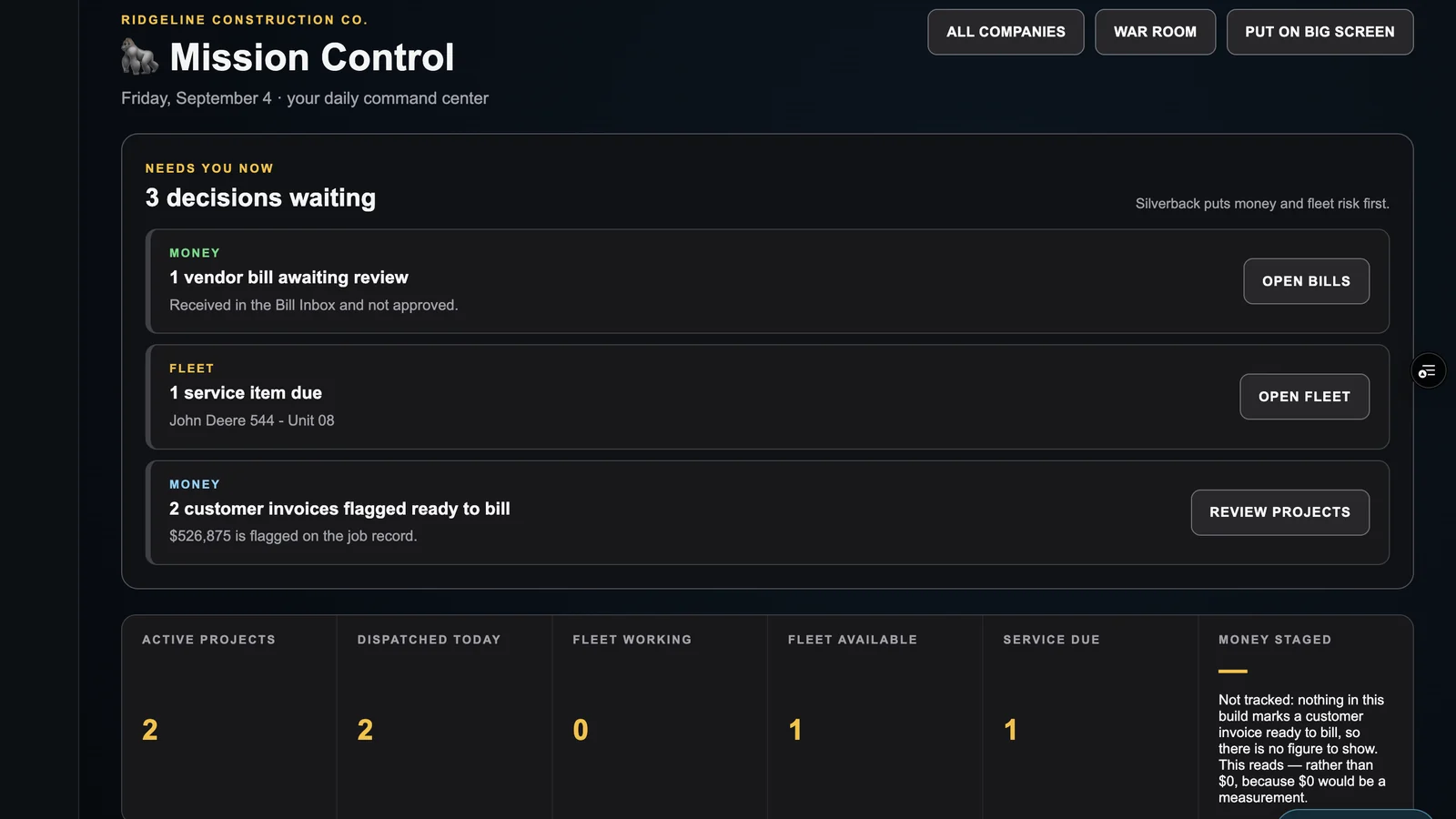
See the whole company in one place.
The day opens on the decisions actually waiting on you — a bill to approve, a machine due for service, work that is ready to bill — instead of a wall of charts.
Real screens from the running product, captured on a demo company. The jobs, vendors and figures are examples, not customer data.
All six screens, visible without clicking.
How it works
STEP 01
Pick the modules per company. A concrete outfit and a hauling outfit under the same owner end up with different screens, different roles and different billing.
STEP 02
Cost codes, customers, jobs, equipment, crews and contracts load into one spine. Bills can arrive by email and get read into the system rather than retyped.
STEP 03
Takeoff feeds the budget, purchase orders commit cost, the field posts against the job, and billing reads the contract you actually signed — including a fee floor if the paper says so.
An empty screen and a broken screen are not the same thing, and software that can’t tell you which one you’re looking at will cost you a job.
Design principle — Bad Daddy Operations™
Access
REQUEST ACCESS
Starting at $495 per company. Pricing is based on the modules installed and the number of people using the system.
Tell us what trades you run and how you bill, and we’ll tell you honestly whether it’s a fit today or something to revisit.
Questions
No. It owns the operational side — estimating, purchasing, job cost, dispatch, compliance and customer billing — and reconciles job cost to accounting. Your general ledger stays where it is.
One login. You pick the company at the top of every screen, and there's a portfolio view across all of them. Modules, roles and cost codes are configured per company, because a hauling company and a concrete company do not sell work the same way.
Yes, chosen per contract. Cost-plus bills actual cost plus a fee, including a minimum fee floor when the contract specifies one. Fixed-price bills percent complete against a schedule of values. A fixed-price contract is not allowed to carry a fee, so the same work can't be billed twice.
Set per contract when the contract is entered, with the release condition recorded alongside it. There is deliberately no system-wide default: a blank retainage means nobody has answered yet, which is not the same as a contract that withholds nothing.
Yes — there's a field mobile screen, and roles are separated so a driver or crew member sees their work rather than the whole back office.
It's in active use on real companies and real jobs, and it is still being built out week to week. We'd rather tell you that than describe it as finished. If you need something completely static, this is not it yet.
Pricing is set per company during onboarding, based on the modules installed and the number of people using it. Ask and you’ll get a real number, not a "contact sales" loop.